
False Dream
Released Jan 2024
You find yourself trapped in a dream. If you capture anomalies in the dream with a camera, you might be able to escape.
96% positive · 485 reviews
Done
All announced content has been released
High confidence
Done
All announced content has been released
High confidence
Where to buy
Steam $1.99
Can't confirm — worth a look
We couldn't confirm these stores carry this game.
Green Man Gaming Steam key Search IndieGala Steam key Search Prices in USD, as listed by each store.
Buying through an affiliate store helps support the site
Evaluation
False Dream launched on January 16, 2024 and received a series of updates over the following weeks, adding features like save functionality, gamepad support, and quality-of-life improvements. On February 23, 2024, the developer explicitly stated in the v1.10.1 patch notes: "This update marks the final update for FalseDream." This is a direct, unambiguous declaration that development is complete. The developer also noted their intent to create more anomaly-finding games in the future — which they followed through on by releasing "False Mall," a spiritual successor, on August 26, 2024. A Nintendo Switch version of False Dream also launched in April 2024, described as matching "the final version on Steam." The game shipped as a self-contained experience with 81 anomalies, and the developer has confirmed no further content is planned for it.
Evidence
Developer explicitly stated: 'This update marks the final update for FalseDream.' v1.10.1 was the last patch.
Developer released 'False Mall,' a spiritual successor to False Dream, consistent with their February 2024 statement of intent to make more anomaly-finding games rather than continue updating False Dream.
Media
Details
Developer
Publisher
TenkaiGames
Achievements
6
Platform
Windows
Controller
full support
Steam Deck
Playable
Players
Single-player
About this game
You find yourself trapped in a dream. Capture anomalies, meaning locations or phenomena that deviate from reality, with a camera. By doing so, you might be able to return to reality.
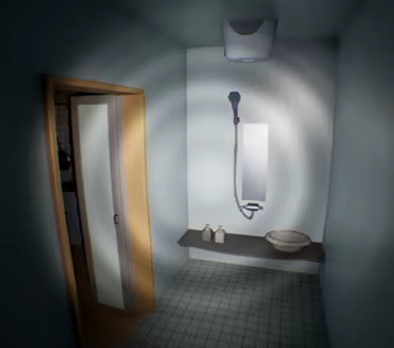
In Normal Mode, an anomaly will always occur at each time.
However, in Nightmare Mode, there are instances where no anomaly occurs. Is it that there are no anomaly, or is it simply that you haven't been discovered yet?
I recommend starting with the normal mode.
Additionally, it may not work without a driver that supports DirectX12.
insufficient graphics card memory could also be considered as one of the causes. Please try reducing the graphics quality from the settings menu.
If it still does not work, please proceed with a refund.
- Set the "Head Bob" slider to 0.
- Set the "Motion Blur" slider to 0.
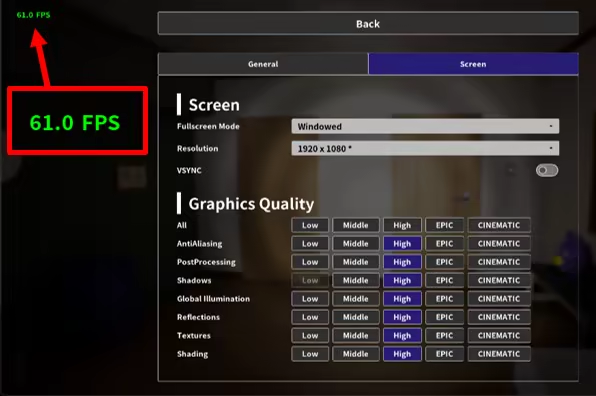
If your FPS (Frames per Second) is low, consider lowering the graphics settings. After starting the game, pause it to see the FPS displayed in the top left corner. The FPS is adjusted in-game to range from 22 to 62.
How do I play?
Please take a look at the image below. Can you spot any unusual elements? It's a game where you find them and capture a photo with a camera.Two Modes
There are two modes: Normal Mode and Nightmare Mode.In Normal Mode, an anomaly will always occur at each time.
However, in Nightmare Mode, there are instances where no anomaly occurs. Is it that there are no anomaly, or is it simply that you haven't been discovered yet?
I recommend starting with the normal mode.
Playtime and content size
The expected playtime to clear the normal mode once is approximately 20 minutes to 1 hour and a half. It would take more than three hours to capture all anomalies. There will be a total of 81 anomalies occurring.Save Data
Even if you stop the game midway, the anomalies you've captured are saved. However, please be aware that anomalies discovered using the radio (helping item) are not saved, so please be cautious.If the Game Crashes
There are reports that updating the graphics card driver to the latest version resolves crashes.Additionally, it may not work without a driver that supports DirectX12.
insufficient graphics card memory could also be considered as one of the causes. Please try reducing the graphics quality from the settings menu.
If it still does not work, please proceed with a refund.
Gameplay Videos and Streaming
Feel free to publish gameplay videos or stream the game without contacting the developer.For Those Prone to Motion Sickness in 3D
Adjust the following settings in the configuration menu:- Set the "Head Bob" slider to 0.
- Set the "Motion Blur" slider to 0.
Recommended Graphics Settings
Setting the Global Illumination to "High" or higher enhances the game's atmosphere thanks to UE5's Lumen feature. However, be aware that this can significantly strain your GPU, potentially resulting in slower performance.If your FPS (Frames per Second) is low, consider lowering the graphics settings. After starting the game, pause it to see the FPS displayed in the top left corner. The FPS is adjusted in-game to range from 22 to 62.
Are these done yet?
![[Chilla's Art] Shinkansen 0 | 新幹線 0号](https://shared.akamai.steamstatic.com/store_item_assets/steam/apps/2793370/header.jpg?t=1712378962)


Last evaluated Jun 20, 2026
Something about this evaluation looks wrong Report illegal or harmful content