
Movavi Video Suite 2022 Steam Edition - Video Making Software: Video Editor Plus, Screen Recorder and Video Converter Premium
Movavi Video Suite is an all-in-one app that will help you create your own video editing ecosystem. You can record your computer screen, edit a video and then convert it to any format you want. Thanks to the handy interface, you can use the program even if you’re a beginner.
Where to buy
Evaluation
Content
Media
Details
About this game
Movavi Video Suite is a 3 in 1 program: video editor, screen recorder, and video converter. Turn your gameplay footage into engaging Let’s Play videos, add special effects and save your comments with a webcam, and then convert your clip to any popular format. You can also record program manuals, play any movies and music, and upload files on different devices.
Now DLC is available! Liven up your gameplay and upgrade your favorite characters.
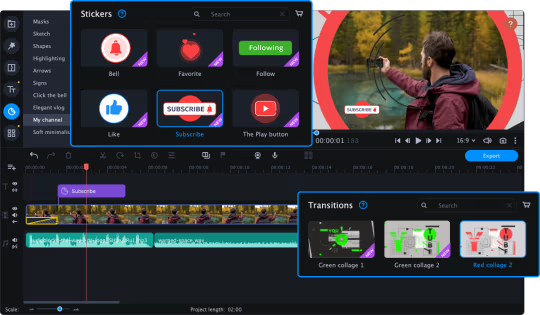
You can also add backgrounds, stickers, and titles from different effects sets — ‘Let’s Start a Vlog’, ‘Handy Set’, ‘VHS’, and more.
We’ve prepared a gift for those who will buy Movavi Video Suite — a free effects set ‘Pixel Age’!
Dive into nostalgia and try golden age titles and stickers, as if you were playing your favorite 8-bit game.
What’s New?
Integration with DLC
Audio tools and effects
Transitions with the built-in audios
Fast Track HD for 4K и 8K movies
Objects tracking
Drawing on videos while recording
Sharing audios on Google Drive
Timeline upscaling for precise cutting
Frame-by-frame preview on the timeline
Time spinbox for the pinpoint cutting
Undo/Redo tools
Updated interface with a Bright theme
Make Video Editing Your Favorite Playground
Use your creativity to make the most engaging vlog ever – you have everything you need to do it. Manage your footage on a convenient multi-track timeline and don’t worry about large files – thanks to the Fast Track HD technology, your computer won’t freeze while working with Full HD and 4K videos.
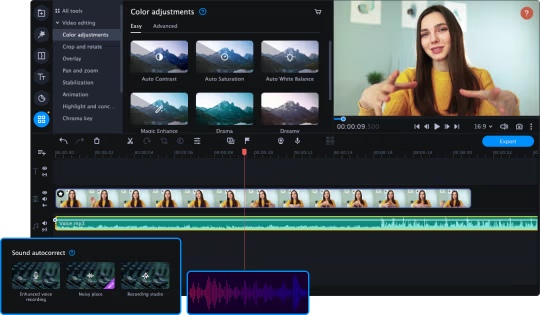
Try basic editing: trim, rotate and enhance clips, color-grade videos with lookup tables, join files with transitions — especially, transitions with the built-in sounds. When you’re done with the simple tools, try advanced features — Chroma Key, Stop Motion, and Object Animation, — insert stickers, logos, and titles. Cut, trim, and sync audio, normalize volume, tweak equalizer settings, and more. You can even create your own intro from anything you can find in the program: backgrounds, titles, stickers, callouts, and even music. Then save the clip and use it in every video you create.
Convert Files at the Speed of Light
Make sure your gameplay videos can be seen on any platform or device — thanks to 180+ supported formats and 200+ available mobile presets. You can use those presets to transform files to any smartphone, tablet, and laptop. Even the newest devices are available. Thanks to the SuperSpeed, you can convert files in no time, plus use other types of hardware acceleration: Intel HD Graphics, AMD, and CUDA.
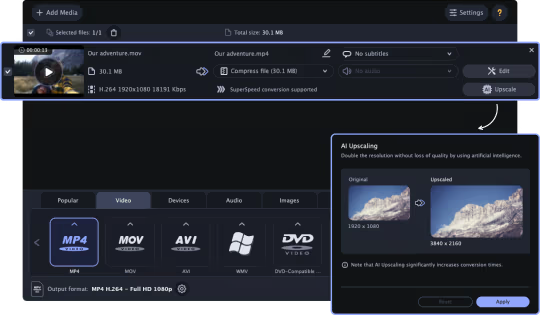
Before the conversion, you can perfect your clips. Scale up the timeline and use frame-by-frame preview to find the fragment you need. You can now cut your clip with pinpoint accuracy thanks to the time spinbox. Just set the right time to delete unwanted footage. You can also add filters, reduce the ‘red-eye’ effect, insert watermarks, and change brightness and contrast.
Grab Everything From Your Desktop
Capture any activity on your desktop: live streaming, video chats, webinars, and program usage. Overlay a webcam video, and you’ll get a real live screencast. You can also record audio and webcam video without recording the screen. Now it’s possible to draw on videos during the recording: leave comments, add arrows and geometric figures, and highlight the main objects. You can edit screenshots, too: crop, rotate, and add text.
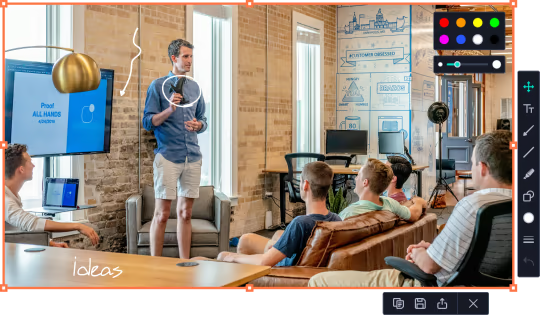
Another cool feature is the recording scheduler: choose date and time, and the program will record your screen at the right moment.
Even More Tools
Easily share captured or edited videos via YouTube or Google Drive
Send file links to your friends via Telegram and WhatsApp
Automate video making with the Montage Wizard: just add the footage and enjoy the result
Split videos into multiple clips with one click
Watch videos and listen to your favorite music via a handy media player
Transfer data to CD, DVD, or Blu-ray
Capture video from any external device – webcam, TV tuner, or VHS