
Charlie II
Released Feb 2018
Charlie II is a classic side-scrolling platform game. Run through levels, collect coins, diamonds and other power ups. Jump on top of enemies to defeat them. Dive into the water to find hidden areas!
80% positive · 31 reviews
Pending
Released · Awaiting evaluation
Pending
Released · Awaiting evaluation
Where to buy
Steam $11.99 Green Man Gaming Steam key $11.99
Can't confirm — worth a look
We couldn't confirm these stores carry this game.
IndieGala Steam key Search Prices in USD, as listed by each store.
Buying through an affiliate store helps support the site
Media
Details
Developer
Publisher
Wiering Software
Achievements
62
Platform
Windows
Controller
partial support
Steam Deck
Not rated
Players
Single-player
About this game
Charlie II is an old school 2D side-scrolling platform game. Run through levels, collect coins, diamonds and other power ups. Jump on top of enemies to defeat them. Dive into the water to find hidden areas!
This is an updated version of the original game from 2001 to make it work on modern computers.
In this game, you must collect enough coins and diamonds before you may exit a level. Depending on the chosen difficulty, the required percentage is 45%, 60% or 75% (easy, normal, hard). Once you have collected the required amount, you will see the message "Find the exit!".
There are also 7 letters (C, H, A, R, L, I, E) that you can collect in each level. Collecting them is not required for 100%, but they may help you find areas you haven't explored yet, since the letters are generally layed out from left to right.
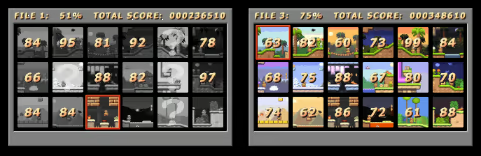
At first, you can only play through the entire game without going back to a previous level. Some levels (indicated with a '?') are hidden, to play them, you must find the secret exit in the previous level. After you have completed the game, you will be able to select any level to play so you can find all the hidden items and secret areas to increase your score for each level until you get 100% everywhere.
The game can run using either OpenGL or DirectX (Options, Video, Graphics). If the game doesn't run smoothly, try adjusting this. Note that the Steam overlay may not work for DirectX, if you need that, choose OpenGL.
The default keys are:
[Left] and [Right]: walk
[Ctrl]: walk faster
[Space]: jump
[Down]: in some places Charlie can dive into the water
[Ctrl+P]: pause game
[Alt+Enter]: swich between full screen and windowed mode
This is an updated version of the original game from 2001 to make it work on modern computers.
In this game, you must collect enough coins and diamonds before you may exit a level. Depending on the chosen difficulty, the required percentage is 45%, 60% or 75% (easy, normal, hard). Once you have collected the required amount, you will see the message "Find the exit!".
There are also 7 letters (C, H, A, R, L, I, E) that you can collect in each level. Collecting them is not required for 100%, but they may help you find areas you haven't explored yet, since the letters are generally layed out from left to right.
At first, you can only play through the entire game without going back to a previous level. Some levels (indicated with a '?') are hidden, to play them, you must find the secret exit in the previous level. After you have completed the game, you will be able to select any level to play so you can find all the hidden items and secret areas to increase your score for each level until you get 100% everywhere.
The game can run using either OpenGL or DirectX (Options, Video, Graphics). If the game doesn't run smoothly, try adjusting this. Note that the Steam overlay may not work for DirectX, if you need that, choose OpenGL.
The default keys are:
[Left] and [Right]: walk
[Ctrl]: walk faster
[Space]: jump
[Down]: in some places Charlie can dive into the water
[Ctrl+P]: pause game
[Alt+Enter]: swich between full screen and windowed mode
Are these done yet?












No evaluation yet
Ask us to evaluate this game's completeness Report illegal or harmful content