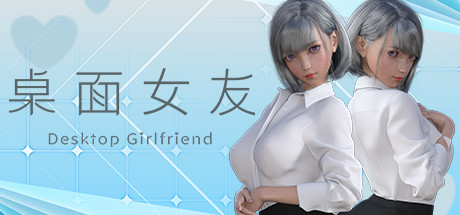
Desktop Girlfriend
Released Aug 2022
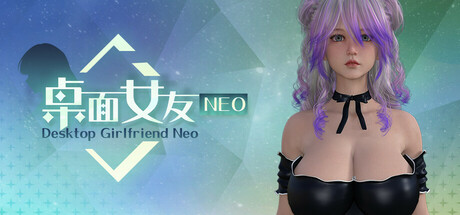
Desktop Girlfriend is a desktop interactive girlfriend game that allows users to interact with their virtual girlfriend in various ways, such as interactive games, customizing her hairstyle, hair color, and more.
69% positive · 725 reviews
Done
All announced content has been released
High confidence
Done
All announced content has been released
High confidence
Where to buy
Steam $1.99
Can't confirm — worth a look
We couldn't confirm these stores carry this game.
Green Man Gaming Steam key Search IndieGala Steam key Search Prices in USD, as listed by each store.
Buying through an affiliate store helps support the site
Evaluation
Desktop Girlfriend launched on August 23, 2022 and received a burst of feature patches and bug fixes in the weeks immediately following launch, running from August 29 through September 14, 2022. These post-launch patches added small quality-of-life features and bug fixes. After September 14, 2022, developer communication went quiet for over three years. The only post since then was on January 7, 2026, when Steam Trading Cards were added — a platform-level feature that does not indicate new game content or ongoing development work. The single released DLC (Mystery DLC, released August 10, 2022) shipped before the game itself and is fully available. The store description mentions Steam Workshop support, which appears to have been implemented during those early post-launch patches. There are no announced future content plans, no unreleased DLC, and no developer statements suggesting further updates are coming. The game launched as a small, self-contained experience and the developer's post-launch activity tapered off by mid-September 2022.
Evidence
Last substantive developer patch, fixing bugs and optimizing resolution switching. No further game content updates after this date.
The only DLC (Mystery DLC) was released before the game's launch date and is fully available
Content
1 of 1 released · no outstanding content
Media
Details
Developer
Publisher
DigitalDream
Achievements
71
Platform
Windows
Controller
—
Steam Deck
Not rated
Players
Single-player
About this game
Desktop Girlfriend is a desktop interactive girlfriend game that allows users to interact with their virtual girlfriend in various ways, such as interactive games, customizing her hairstyle, hair color, and more. Desktop Girlfriend is a faithful girlfriend who loves the user, she will always be with the user, so that the user does not feel alone. In addition, the game plans to support steam workshop, which allows users to make and upload their own kind of girlfriend and all kinds of animations, making the game even richer!
Features.
-Custom hair and hair color
-Customize nail color
-Custom scene lighting colors
--6 different endings of the plot play
-2 mini-games
-Characters and clothes with physics effects
-Realistic eye system
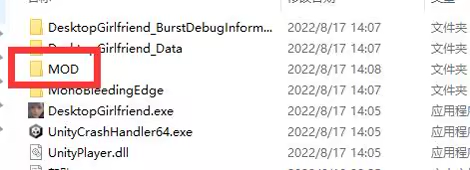
As shown in the picture above, all the mod's teaching content and tools are contained in this folder, please read it carefully.
Win7
Click the system icon at the bottom left corner of the desktop - Control Panel - System and Security - System - Advanced System Settings - Advanced - Performance - Settings, check [Aero] and [Clear Glass], then click [Adjust to Best Appearance], after that click [OK]
Win10
Open [DVIDIA Control Panel] - [Manage 3D Settings], find [Multi-Frame Sampling AA (MFAA)] and [Smooth Processing - FXAA] and change these two options to [Off]
If the above method still does not solve the problem, please try the following general method
1. Restart the computer
2. Desktop right mouse button - personalization - color - turn on the transparency effect
3. Go to the official website of the graphics card to download the latest graphics card driver, the installation process select "custom installation" > check the "clean install" , you can not use the default override upgrade installation
Features.
-Custom hair and hair color
-Customize nail color
-Custom scene lighting colors
--6 different endings of the plot play
-2 mini-games
-Characters and clothes with physics effects
-Realistic eye system
【Steam Workshop】
[Mod Teaching]
Open the steam client, enter the game library, right-click the game icon -> Manage -> browse local files. Open the game installation directory.As shown in the picture above, all the mod's teaching content and tools are contained in this folder, please read it carefully.
【What should I do if I can't play the game? ]
Can not run the game normally, has been stuck in the loading interface, the character background becomes black and can not see the desktop solutionWin7
Click the system icon at the bottom left corner of the desktop - Control Panel - System and Security - System - Advanced System Settings - Advanced - Performance - Settings, check [Aero] and [Clear Glass], then click [Adjust to Best Appearance], after that click [OK]
Win10
Open [DVIDIA Control Panel] - [Manage 3D Settings], find [Multi-Frame Sampling AA (MFAA)] and [Smooth Processing - FXAA] and change these two options to [Off]
If the above method still does not solve the problem, please try the following general method
1. Restart the computer
2. Desktop right mouse button - personalization - color - turn on the transparency effect
3. Go to the official website of the graphics card to download the latest graphics card driver, the installation process select "custom installation" > check the "clean install" , you can not use the default override upgrade installation
Are these done yet?








Last evaluated Jun 21, 2026
Something about this evaluation looks wrong Report illegal or harmful content