Done
All announced content has been released
High confidence
Where to buy
Steam $3.99
Can't confirm — worth a look
We couldn't confirm these stores carry this game.
Green Man Gaming Steam key Search IndieGala Steam key Search Prices in USD, as listed by each store.
Buying through an affiliate store helps support the site
Evaluation
DesktopMMD3: Miss Fish launched on January 21, 2021 and received a flurry of feature patches in its first two weeks, adding capabilities like touch interaction, emotion customization, and a new action module. After launch, the developer's attention clearly shifted toward DesktopMMD4: Born to Dance, a successor application that was announced and released on May 6, 2022 as a free upgrade for all DesktopMMD3 owners. The store page now prominently advertises this deal. A final bug fix patch for DesktopMMD3 followed on May 31, 2022, which appears to be the last official communication from the developer regarding this title. No further updates, announcements, or roadmap items have been posted since then. With the developer having moved on to a new generation of the product and DesktopMMD3 receiving no communication since May 31, 2022, the game is effectively a finished, static product at this point.
Evidence
Developer announced and released DesktopMMD4 as a free upgrade for all DesktopMMD3 owners, positioning it as the next generation of the product with major technical improvements. This effectively marks the end of new feature development for DesktopMMD3.
Final bug fix patch for DesktopMMD3, optimizing model and dance list loading speed. This is the last recorded developer communication for this title.
Media
Details
Developer
Publisher
XDesktopSoft
Achievements
—
Platform
Windows
Controller
—
Steam Deck
Not rated
Players
Single-player
About this game
Buy DMMD3 Get DMMD4 Free
Buy “DesktopMMD3:Miss Fish” Now and Get "DesktopMMD4: Born to Dance"The difference between DesktopMMD3 and DesktopMagicEngin
Touchable Lover
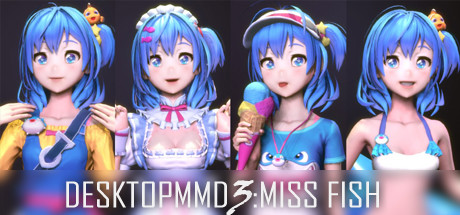
Living and dancing lovely girl “Miss Fish” on your desktop! She will always be with you, even while playing game or browsing the web.Features:
- BRAND NEW Next-Generation HD Rendering Engine, make the models render more realistic and high visual fidelity.
- BRAND NEW Mouse Move Touch Function ,now the mouse can really pass through model's hair and skirt.
- BRAND NEW Model Customization Module, supports customizing every part of the model, such as adjusting the rendering style and color or visible.
- BRAND NEW Interactive Action Module, support custom motion, voice, emotion and LipSync,support workshop, Built-in 75 female motions and 68 male motions, 126 female voices and 126 male voices.
- BRAND NEW Lovely default characters “Miss Fish” comes with four outfits.
- Gives your desktop some life with lovely AI girls and lots of Interactive animations.
- Supports third party music players such as CloudMusic, QQMusic, Spotify, Winamp, Foobar2000, Kugou and so on.
- Support act on top of other windows (Optional).
- Support idle animations and interacte with mouse cursor.
- Support one-click import of MMD / VRM models
- Contains 60 built-in dance templates (19 slow-rhythms / 15 mid-rhythms / 17 fast-rhythms / 8 short-dances / moonwalk). It allows easily-applied personalization of dances for your favorite music.
- Compatible with all other software and live wallpapers.
- Supports Windows 7 (with Aero), 8, 8.1 and 10
Credits
- "Miss Fish" model created by "Press START"
- Translation / Proofreading by Nyanco Channel
================================================================================
Q: Why is my background all black on some computers?
A: You can press the "Win" key to pop up the taskbar, and then proceed to the following operations:
1. Open the Nvidia panel and select [manage 3D settings] on the left
2. [multi frame sampling AA (MFAA)] and [smoothing fxaa] in the right side are changed to [off]
3. Close the application to solve the problem of game black screen.
Q: Why can not display model on desktop sometimes?
A: Some models has problem and make DesktopMMD3 crash ,just need close all models in "Manage Model">"Loaded" List and restart DesktopMMD3 from tray icon popupmenu.
Q: How to add model to desktop?
A: You can subscribe models from STEAM Workshop at "Manage Model">"Workshop" , and then load model at "Manage Model">"Installed" list.
Q: How to import MMD/VRM model into DesktopMMD3?
A: Drag and drop MMD model file .pmx or .vrm file into DesktopMMD3 "Manage Model">"Installed" List Box, the model will auto display on your desktop.
Q: How to Hiding "Now Playing DesktopMMD3" from Steam status?
A: Right click tray icon and select menu item "Preferences" and uncheck the "Enable Steam Support", and restart app from tray icon menu.
Q: How to set higher Anti-aliasing ? How to set the model to HD texture? How to modify the drawing quality of the model?
A: "Settings">"Graphic Quality" option set to "High" .or You can switch to HD mode: right-click the model and select the menu item "Edit" in the "Manage Model"> "Installed" list, and select "Graphic Quality" as "Hight" in the edit window. Then reload the model.
Are these done yet?





Last evaluated Jun 23, 2026
Something about this evaluation looks wrong Report illegal or harmful content